For Teams & Distributed Orgs

Zikra

Lite fixed the problem for one developer. This is what we built when the team joined — PostgreSQL + pgvector + n8n so that decisions made in one session, by anyone on the team, are visible everywhere within seconds.

PostgreSQL 14+ pgvector n8n Docker Compose Multi-user RBAC

What the team made harder

Lite solved the solo problem. When more people joined, the same failure mode multiplied.

📍

Location drift

Engineer A in London writes a requirement. Engineer B in Singapore starts building the opposite. No one knows until code review — days later.

🔁

Repeated decisions

The same architectural question gets answered five times across five sessions because no one can search what was already decided.

🚪

Context leaves with people

A developer leaves the team. Three months of decisions, error patterns, and schema knowledge walks out with them.

How Zikra Pro works

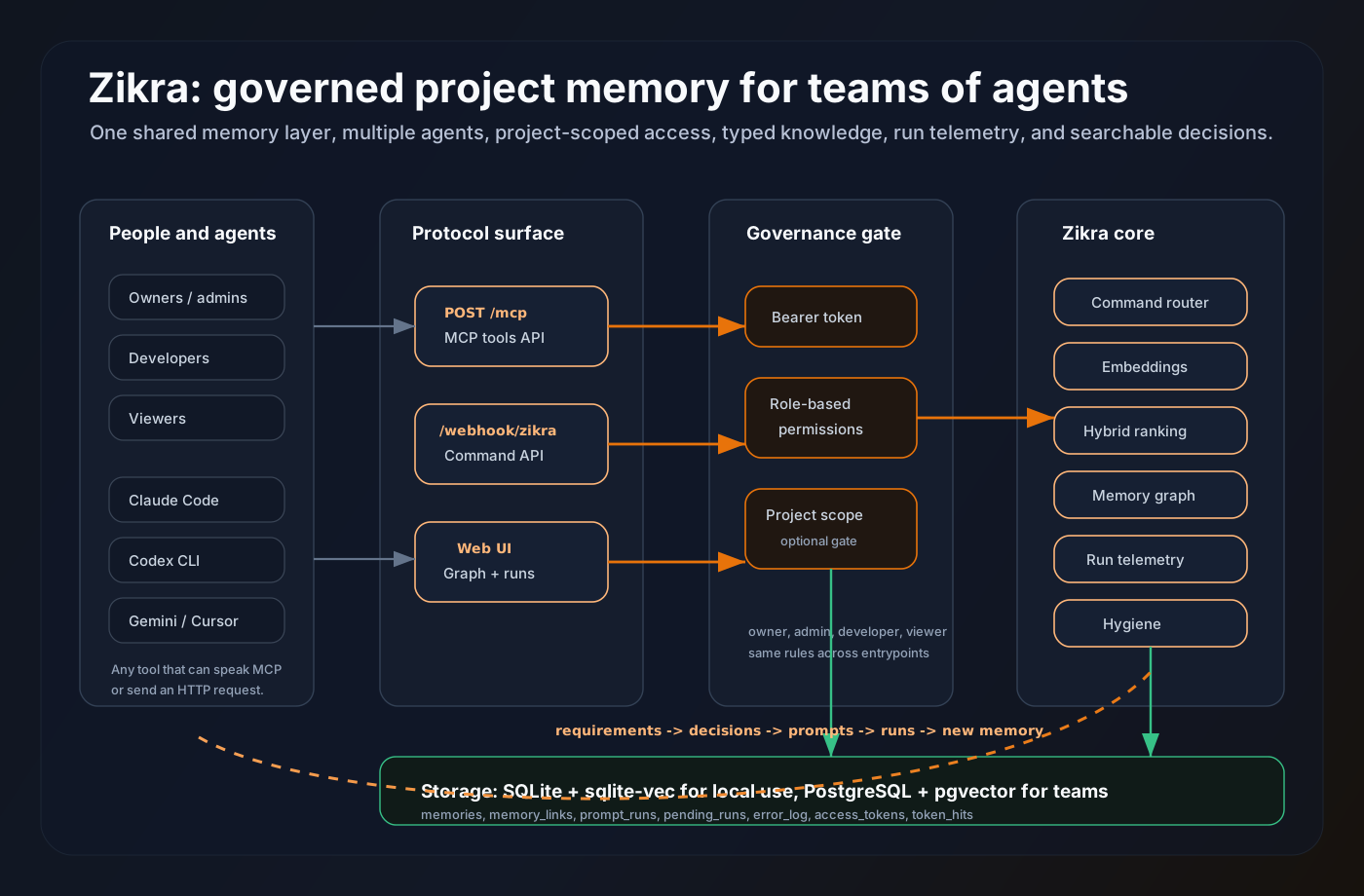
Hooks on every machine funnel into one central database. Every agent queries the same store.

── Machine A (London) ────────────────────────────────────────────────── Claude Code ──Stop hook──▶ zikra_autolog.sh ──▶ n8n webhook Cursor ──Stop hook──▶ zikra_autolog.sh ──▶ n8n webhook ── Machine B (Singapore) ──────────────────────────────────────────────┤ Claude Code ──Stop hook──▶ zikra_autolog.sh ──▶ n8n webhook ──▶ ── Central Server ─────────────────────────────────────────────────────┘ n8n ──embed──▶ OpenAI / local model ──▶ PostgreSQL + pgvector ◀── search ─────────────────────────────┘ ← any agent, any machine
Step 1

Hooks on every machine

Each developer installs Zikra's Stop and PreCompact hooks. At the end of every Claude Code or Cursor session, the hook fires and POSTs the session summary to your central n8n instance.

  • One curl-based install per machine
  • Configurable webhook URL and bearer token
  • Works on Linux, macOS — any machine with bash
  • Silent background operation — no interruption to workflow
# Install on each machine (60s) $ curl -fsSL https://zikra.dev/install.sh | bash ? Webhook URL: https://n8n.yourteam.com/ ? Bearer token: •••••••• ? Default project: myapp ✓ Stop hook installed ✓ PreCompact hook installed ✓ Verified connection to n8n
Step 2

n8n routes and embeds

Your self-hosted n8n instance receives every session payload. It calls the OpenAI embedding API (or your local model), generates a 1536-dim vector for each memory, and writes both the text and the vector to PostgreSQL.

  • n8n workflow included in the repo — import and go
  • Embedding generation happens server-side — clients stay lightweight
  • pgvector handles approximate nearest-neighbor at scale
  • ivfflat index — performs at millions of memories
# docker-compose.yml — one command setup $ cp .env.example .env $ docker compose up -d ✓ postgres:15 started on :5432 ✓ n8n started on :5678 ✓ pgvector extension loaded ✓ Zikra ready

Requirement transfers across locations

The most common failure mode in distributed teams: two people building in opposite directions. Zikra Pro closes that gap.

Write once, visible everywhere

A product manager in one location writes a requirement: "API must respond within 200ms under normal load." It's saved with save_requirement and immediately indexed in the central PostgreSQL store.

Two hours later, an engineer in a different city starts a new Claude session. The session's context file automatically pulls the top requirements matching the current project — and Claude opens with full awareness of the constraint.

  • Requirements stored as searchable memories (memory_type='requirement')
  • Same hybrid search — finds requirements by meaning, not just keywords
  • Cross-project or project-scoped — controlled by the project field
  • Any agent (Claude, Cursor, Aider) reads the same requirements store
# PM in London writes the requirement { "command": "save_requirement", "project": "payment-api", "title": "API latency SLA — 200ms p99", "content_md": "All /v1/charge endpoints must return within 200ms at p99 under 500 rps. Validated by load test before each release." } # Engineer in Singapore opens a new session # CLAUDE.md pulls top requirements automatically: ✓ API latency SLA — 200ms p99 (score 0.91) ✓ Auth token expiry — 7 days (score 0.78)

Everything in Zikra Lite, plus team features

Zikra builds on the same API surface. No commands to relearn.

🔐

Multi-user RBAC tokens

Issue separate bearer tokens for each developer, CI machine, or external agent. Role-based control: reader · writer · admin. Scope tokens to specific projects. Revoke instantly.

📊

Active session tracking

The active_runs table records every live session. See who is working on what, in real time. Session IDs extracted from Claude Code JSONL transcripts automatically.

pgvector at scale

IVFFlat index with 100 lists handles millions of memories without degrading search quality. PostgreSQL's battle-tested durability and WAL replication — your team's memory doesn't disappear.

🔗

n8n workflow automation

n8n sits between hooks and PostgreSQL. Add custom logic: Slack notifications when a critical decision is saved, weekly memory digests, or auto-tagging by project keyword. All configurable without code.

🪝

Full hook suite

Stop hook, PreCompact hook, session capture daemon, and the Neovim statusline plugin. Every touchpoint in a developer's workflow can feed Zikra Pro automatically.

🧩

Agent agnostic

Claude Code, Cursor, Aider, Gemini CLI — if it can fire a shell hook or call a webhook, it works with Zikra Pro. One memory store for every tool your team uses.

Quick start

Three commands to bring up the full stack. One curl to verify.

# 1. Clone and configure $ git clone https://github.com/getzikra/zikra && cd zikra $ cp .env.example .env # set POSTGRES_PASSWORD, N8N_BASIC_AUTH_PASSWORD, WEBHOOK_URL # 2. Start the stack $ docker compose up -d ✓ postgres:15 started ✓ n8n started # 3. Install hooks on each machine $ curl -fsSL https://zikra.dev/install.sh | bash ✓ Zikra Pro ready — shared memory active

Upgrading from Zikra Lite?

Same API surface. Same command names. Same JSON shapes. Point your agents at the new endpoint and your existing integration keeps working without a single change.