Team memory for AI agents — not just session recall

One shared brain. Every agent. Every person. Every project.

Zikra is the memory layer for AI-native teams. Claude Code, Gemini CLI, and Codex share the same pool — scoped by project, governed by role, and fresh through built-in hygiene. Scales to millions of memories.

Not just "one agent remembers more." Five people, three agents, four projects — all sharing the right context with the right people automatically.

★ Star on GitHub How to Install
zikra — live memory
$ curl -s -X POST http://localhost:8000/webhook/zikra \ -H "Authorization: Bearer $ZIKRA_TOKEN" \ -d '{"command":"search","project":"myapp","query":"how does auth work"}' ────────────────────────────────────────────────── ✓ score 0.94 │ auth uses JWT tokens ✓ score 0.87 │ session expiry set to 7 days in prod 2 results · 38 tokens · your agent remembers

What Zikra does

One memory pool for your whole team. Claude, Gemini, and Codex share context, pass requirements, and approve decisions — automatically, across every machine.

Core capabilities

FeatureWhat it does
Shared persistent memory One PostgreSQL pool. Every agent, every machine, every session reads and writes the same context. Decisions made in Claude Web are visible in Claude Code seconds later.
Agent-agnostic Claude Code (MCP native at /mcp), OpenAI Codex (webhook at /webhook/zikra), Gemini CLI (webhook at /webhook/zikra), any MCP client (standard MCP protocol). Same token. Same memory pool.
Role-based access owner, admin, developer, viewer. Enforced at the router. Owners create tokens and promote requirements. Developers write and search. Viewers read only.
Smart ranking Search results are re-ranked by age, access frequency, and confidence — recent and well-used memories surface first.
Requirements pipeline A business user writes a requirement in Copilot or any AI. Owner promotes it. Developer pulls and executes it in Claude Code. Full traceability from spec to execution.

Full feature set

FeaturePurpose
Hybrid searchVector search with keyword fallback — semantic embeddings when available, full-text keyword search when not.
Token-budget resultsResults are tiered and capped. Never floods your context window.
Auto-save on session endClaude Code Stop hook fires on close. No manual saving.
PreCompact hookSaves a summary before Claude's context resets. Nothing lost at compaction.
Multi-user tokensEach person gets a scoped bearer token. Identity tracked on every write.
Promote to promptOwner approves a requirement — it becomes a live executable prompt.
Schema storageStore and retrieve DB schema per project and module. Any agent pulls current version before touching backend code.
Error loggingAny agent logs a bug with full context. Vector-embedded, searchable, tracked to resolution.
Debug protocolNamed prompt: read the error, search memory, check resolutions, fix, log. Any agent follows it.
Session trackingEvery run logged — tokens, cost, files modified, status, linked to the prompt that triggered it.
Active runs tableSee which machine is running which prompt in real time across your team.
Statusline barLive in your terminal. Run count, memory count, model, project, context usage. Skull at 600K tokens.
Built-in web UIBrowse memories, graph links, prompts, requirements, runs, token usage, and project-scoped views from the server UI.
MCP nativeClaude connects via MCP trigger. No custom integration.
Alias normaliser"find", "recall", "remember", "query" all route correctly. Agents don't need exact command names.
Self-documenting APIUnknown command returns full reference with examples. No external docs needed at runtime.

How we got here

No polished origin story. Just a real problem that kept getting worse.

M
The frustration

"I like doing my architecture and research on Claude Web. It can browse sites, do deep research, give real suggestions on system design. But when it came time to actually run the code — that's Claude Code's job. The problem? They don't talk to each other. Every new session, you're starting from scratch. Claude Code had no idea what Claude Web and I had just spent an hour designing."

— Mukarram, founder
M
The first build

Started with a simple webhook and SQLite. Then added vector search. Then wired it into Claude Code stop hooks so it ran automatically at the end of every session. You never had to type "save this" — it just happened. Months later it was saving hours a week. We called it Zikra — Arabic for memory.

M
A
R
The team joined

More people joined the project. Suddenly one person is on Claude Web doing research, another validating requirements and writing prompts, Claude Code just executing. Decisions made in one session were invisible to everyone else — two developers would build in opposite directions and not find out until a late-night code review argument. That's when we needed a shared memory layer with real concurrency. We moved to Postgres.

CW
CC
GPT
Agent agnostic

"We even use ChatGPT sometimes when Claude Web is being stubborn about writing a prompt. Doesn't matter. The same MCP server works for all of them. That's Zikra. Not built for a pitch deck. Built because we actually needed it."

— Mukarram
The problem, clearly

Your agents are stateless. Your team isn't. Zikra bridges the gap.

🧠

Team memory

Your AI agents don't remember yesterday. Your team does — but they're spending hours re-explaining context to every new session. Zikra fixes this. One persistent memory layer shared by every agent on your team, across every platform you use.

🔗

Cross-platform continuity

Your Claude, Codex, and Gemini subscriptions are running in silos. Memory written in one platform disappears the moment you switch. Zikra connects them. Run your tests in Claude Code. Validate the results in Gemini CLI. Review in Codex. The memory follows the work, not the platform.

🔑

Role-based access

Not every agent needs to see everything. Zikra gives owners, admins, developers, and viewers scoped access to memories, prompts, requirements, and session logs — per project, per run.

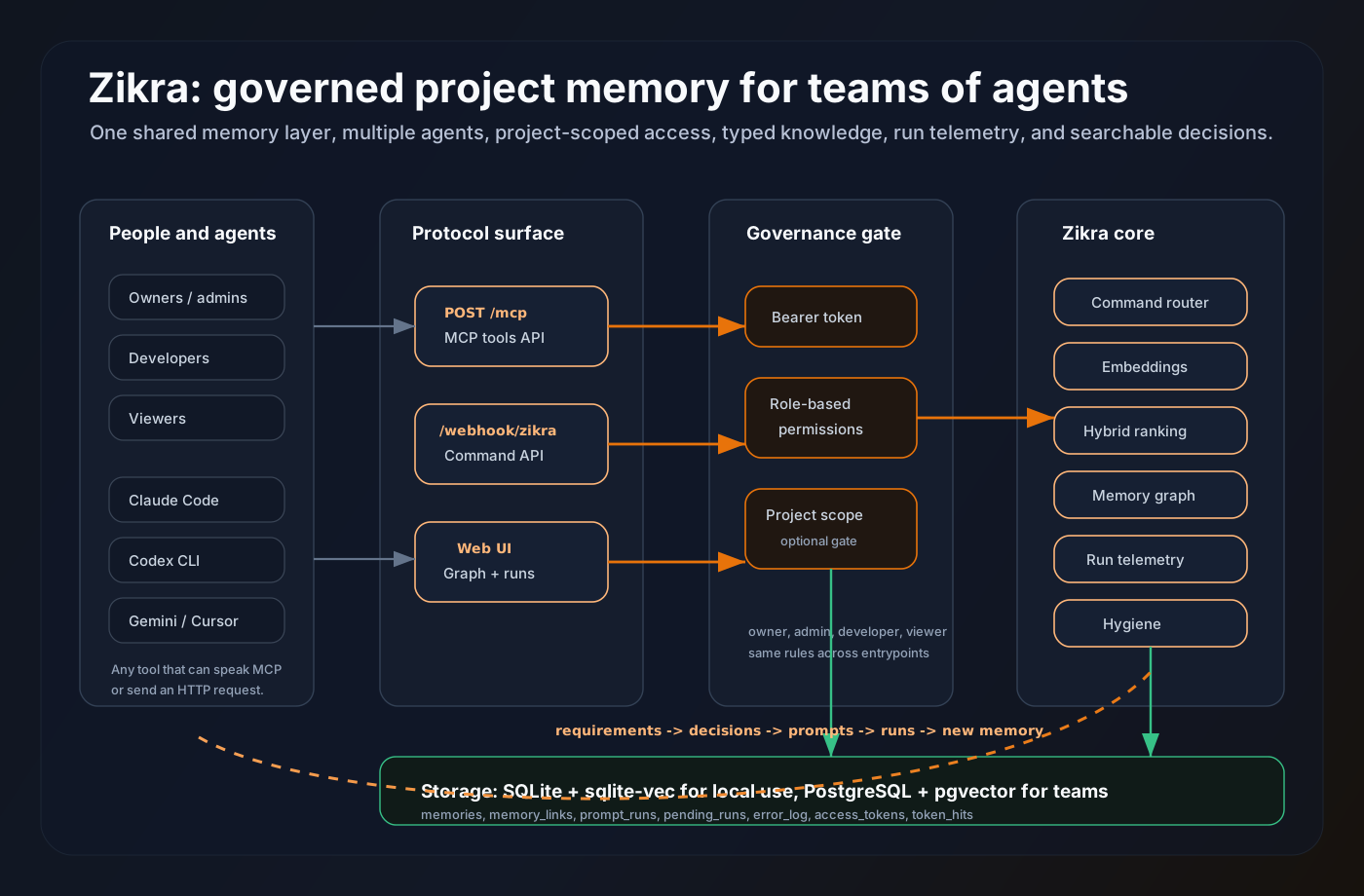
The architecture: governed memory, not another note bucket

Zikra sits between your agents and your project knowledge. MCP clients, CLI hooks, custom agents, and the web UI all pass through the same token gate, project scope, command router, ranking layer, and storage backend.

Zikra architecture diagram showing agents, protocols, governance, core services, and storage

Agent agnostic

Claude Code can use MCP. Codex, Gemini, shell hooks, or custom workers can use the webhook. Same memory pool, same project rules.

Project gated

Roles control what a token can do. Project scopes control where it can do it. This is how memory becomes usable for real teams.

Typed and ranked

Requirements, decisions, prompts, errors, notes, and runs are searchable by meaning, keyword, recency, frequency, and confidence.

The core idea

One memory. Every agent reads from it.

Zikra is a small server that sits between your AI tools and a database. Every agent — Claude, Cursor, Gemini, ChatGPT — can save and search the same pool of context. Architecture decisions, error patterns, requirements, runbook prompts.

One POST to save. One POST to search. It's not magic — it's just memory that actually persists.

  • Hybrid vector + keyword search — finds things by meaning, not just exact words
  • Hooks fire automatically at session end — no manual saving
  • Token budget on results — never floods your context window
# Step 1 — Claude Code saves a test result to shared memory POST /webhook/zikra Authorization: Bearer <your-token> { "command": "save_memory", "project": "payments-api", "title": "Auth flow test — passed", "content": "OAuth2 PKCE flow validated on staging. Token refresh working correctly.", "memory_type": "test_result" } # Step 2 — Gemini CLI reads it on a different machine, minutes later POST /webhook/zikra Authorization: Bearer <your-token> { "command": "search", "project": "payments-api", "query": "auth flow test results" } # Returns the memory Claude wrote — same project, same context, different platform
The part we're proudest of

Automatic. You don't think about it.

The hardest part of any memory system is using it consistently. Claude Code hooks solve that. A Stop hook fires the moment a session ends and logs everything automatically. You never type "save this" — it just happens.

The statusline shows your memory count and session stats right in your terminal. After a while you stop noticing it's there — you just notice Claude always seems to know your codebase.

  • Stop hook logs every Claude Code session on close
  • PreCompact hook saves context before the window resets
  • Neovim and Claude Code statusline — live memory stats
# What Claude sees at session start # (injected from CLAUDE.md automatically) ## Recent memory — myapp ▸ auth uses JWT tokens (0.94) JWT with 7-day expiry. Refresh in httpOnly cookie. ▸ payments use Stripe (0.88) Stripe Checkout. No card data on our servers. 17 runs · 847 memories · last sync 2m ago

Share with your team

Zikra runs on your machine or your server. Getting teammates connected takes one of three approaches depending on where they are.

🏠

Same network

Start Zikra with --host 0.0.0.0 and share your local IP. Anyone on the same wifi or office network connects to http://YOUR-IP:8000 and they're in. Nothing else to install.

🌐

Remote teammates — Cloudflare Tunnel

One-time setup, five minutes, free forever. Cloudflare gives your local Zikra a permanent public URL like zikra.yourteam.com — no ports to open, no router config, no commands to run each time. See the setup steps in the README.

🖥️

Real server — PostgreSQL backend

When your team needs something that runs permanently with shared concurrent writes, set DB_BACKEND=postgres in your .env. Same API, same commands, same Claude Code config — backed by PostgreSQL + pgvector.

Get started in 3 steps

From zero to persistent memory across every session. Takes about 5 minutes.

1

Install the server

Clone and run the interactive installer. One Python process. No Docker required.

git clone https://github.com/GetZikra/zikra cd zikra && pip install -e . python3 installer.py python3 -m zikra

To expose it publicly: cloudflared tunnel --url http://localhost:8000

2

Enable MCP in Claude Code

Open Claude Code → Settings → MCP → Add Server and paste your server URL:

"mcpServers": {   "zikra": {     "url": "http://your-server:8000/mcp",     "headers": {"Authorization": "Bearer YOUR_TOKEN"}   }}

The installer does this automatically for local installs.

3

Run the onboarding prompt

Paste this into any Claude Code session. It installs the Stop hook, PreCompact hook, and live statusline bar automatically.

Fetch https://raw.githubusercontent.com/ GetZikra/zikra/main/prompts/zikra-claude-code-setup.md and follow every instruction in it.

Claude Code will ask for your server URL and token, then configure everything. Gemini CLI and Codex setup prompts coming soon.

Keeping Zikra updated

Server and Claude Code hooks update independently. Both are one command.

🖥️

Update the server

Pull latest and restart. No config changes needed.

git pull origin main pip install -e . python3 -m zikra

Update Claude Code hooks

Re-run the same onboarding prompt. It detects your existing install and only refreshes what changed. Token and config preserved.

Fetch https://raw.githubusercontent.com/ GetZikra/zikra/main/prompts/zikra-claude-code-setup.md and follow every instruction in it.

MCP server settings never need manual updates.

M

This isn't a product pitch. It's a tool we use every day.

Zikra started as an internal tool. We weren't trying to build a product — we were just trying to stop wasting time. It's free, self-hosted, and takes about two minutes to set up. If it helps, great. If something's broken, open an issue.

We're actively using it ourselves, so issues get fixed fast.

— Mukarram

How to Install Star on GitHub